
Why Moving Toward RWD (Responsive Web Design) Has a Direct Effect on Your Marketing

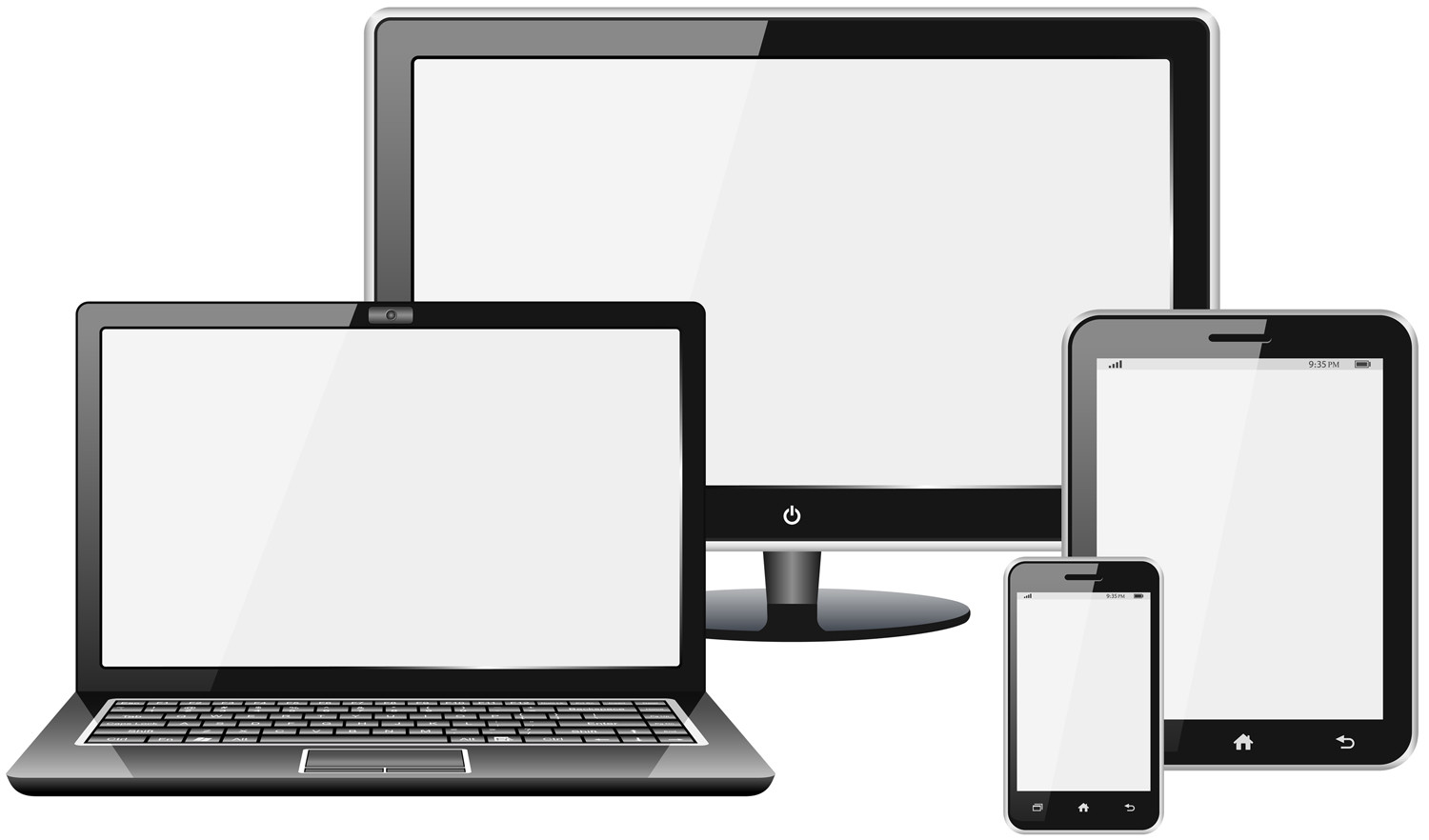
RWDMobile has demonstrated that it is here to stay. As more and more users begin to utterly depend on their mobile device to connect them with the world, it has become even more essential for companies to institute an effective mobile strategy for their website. Since new mobile devices appear every day, web designers must figure out a way to make sure that their websites are compatible with every new gadget that shows up on the market. Responsive web design is one of the most popular methods of achieving this goal.

What is Responsive Web Design?

Although responsive web design (RWD) is still in its early stages, Google already supports the technique as the best practice for developing a mobile website. An article by Ethan Marcotte spawned the concept of RWD as Marcotte toyed with the idea of transferring the idea of responsive architectural design to web design. Essentially, RWD is a system of building a site that responds to user behavior so that users enjoy a high quality experience no matter what device is used. There are three primary characteristics of responsive web design:

  • A fluid grid
  • Response to media queries
  • Flexible images

With these three elements, a website is capable of shifting and adapting for a user based on the platform, screen size, and orientation. Fluid grids allow a website to quickly reconfigure itself to accommodate a new device with appropriate size, margins, and spacing. Different sections of a layout are assigned to different segments of the grid so that the layout can shift to promote the most relevant information.

By responding to CSS media queries, RWD is capable of using the appropriate configuration of the flexible grid. The smallest screens may only see one component of the grid at a time, while larger devices will trigger a more comprehensive view of the site. RWD uses the media queries to detect the type of device, so in addition to presenting the suitable grid the site can adjust its resolution and configure itself for a landscape or portrait view.

The final element of responsive web design is flexible images. Images are designed so that they also adjust to fit a device through a number of methods, such as:

  • Hiding or revealing portions of the image
  • Sliding composite images
  • Scalable images

Thanks to these techniques, viewers will never again be frustrated by an image that is too large or refuses to properly load on a mobile device. RWD ensures that images as well as other media are appealing and manageable in a mobile format.

The Growth of Mobile

The need for such a revolutionary method of mobile web design is the direct result of the boom in mobile device usage in recent years. The statistics about the growth of mobile are staggering and are hard proof as to why it is essential for companies to expand their marketing campaign to target mobile devices. Consider the following statistics:

  • 84% of people surveyed around the world say they couldn’t go a single day without using their cell phone.
  • Global mobile data traffic grew by 70% in 2012, while smartphone usage increased by 81%.
  • 45% of American adults own a smartphone and 31% of them have a tablet.
  • In 2013, the number of mobile-connected devices is projected to overtake the number of the world’s population.

If your company is not targeting this massive audience, you are certainly losing opportunities to engage consumers and promote your brand.

A Versatile Viewing Experience

So why is RWD so great? One of the most popular benefits of RWD is that it eliminates the need for developing a unique site for every device that appears on the market. Theoretically, RWD prepares your site to handle any new gadget that will appear in the near future, however bizarre or revolutionary it may be. Streamlining your web development needs to one design reduces the time and money necessary for an effective website.

However, RWD is not simply beneficial for your company. It also offers a number of advantages to visitors to the site, primarily the all-important high quality viewing experience and complete versatility. Since consumers are beginning to buy more tablets, notebooks, and smartphones than computers, the quality of the viewing experience of your mobile site is just as important as your original site.

As RWD adapts to each type of device, your site can enable special features for touch screens, such as links and buttons that are thumb-friendly or the ability to swipe between different columns. With RWD, the website functions seamlessly through any device so that users can access all of the information on your site from any gadget with no decrease of site quality.

Optimizing For Search Engines

As mentioned above, Google is a strong supporter of responsive web design, largely due to the fact that RWD works well with search engines. Search engines appreciate RWD because it allows for clean, organized code that is easy to search and analyze.

In addition, RWD cuts out the risk of being penalized for creating duplicate content, since there is ultimately only one version of your site. If you were to set up a separate mobile site improperly, you would quickly incur a ranking penalty and therefore lose visitors and conversions. RWD lets your company maintain consistent information across the board.

Marketing Success With RWD

RWD is so effective that it directly increases the success of marketing efforts. For instance, sites that utilize RWD experience fewer abandoned checkouts because they are easier to use on mobile devices. Also, the time invested in your marketing campaign is more efficient because there is no need to continually update multiple sites. Furthermore, your analytics are immediately simplified since you only have one site to track.

In an increasingly mobile world, advancements like responsive web design can prove invaluable to your business. Although RWD may cost more initially to design and set up, the long-term benefits are invaluable. Responsive web design creates an innovative site so that your marketing endeavors can reach their full potential on every mobile device.

https://info.globalit.com/wp-content/uploads/2013/05/RWD.jpg

Online Marketing|Web Design|Webmaster
DNS (Domain Name Services) 101

DNS – (UDP, 53)

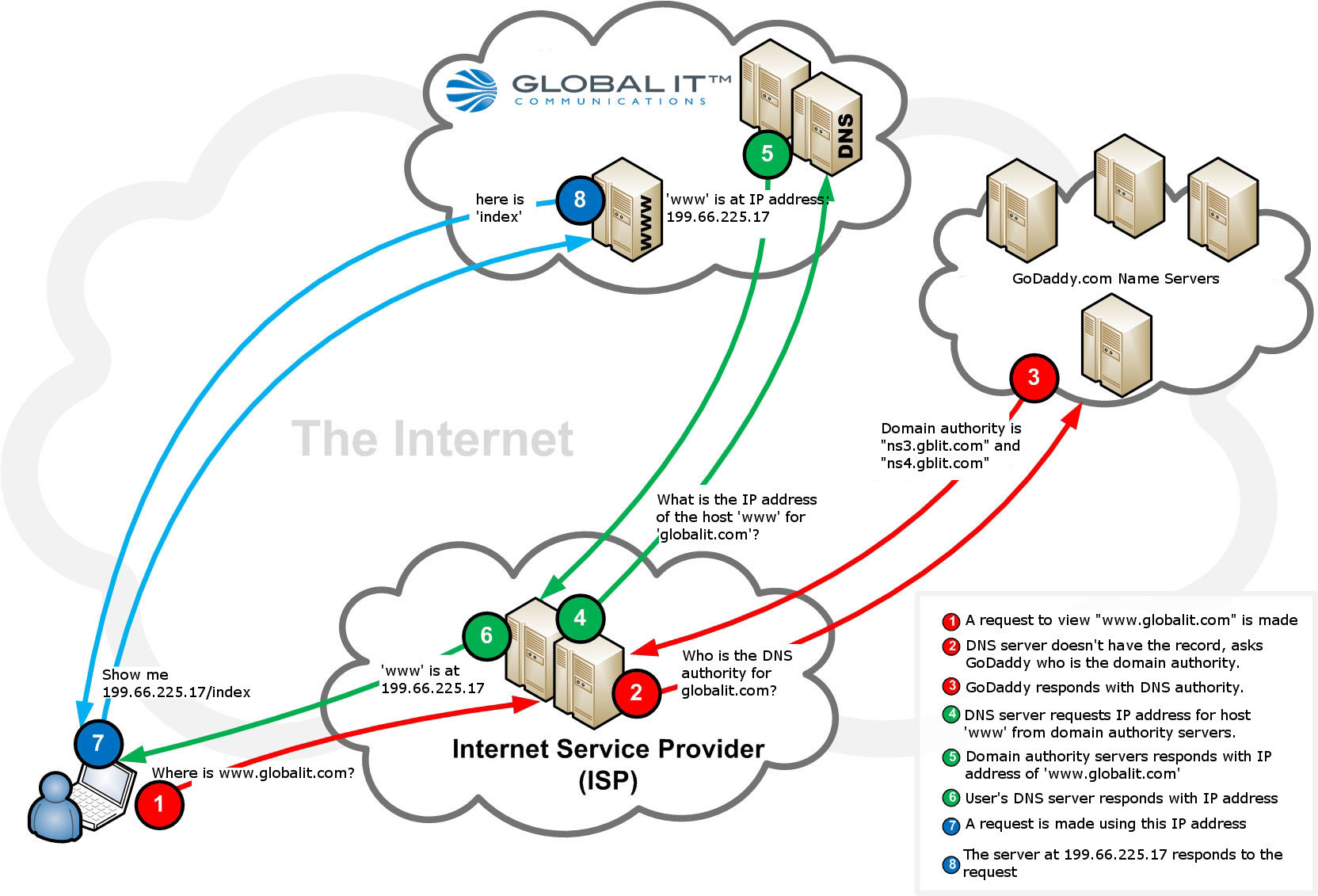
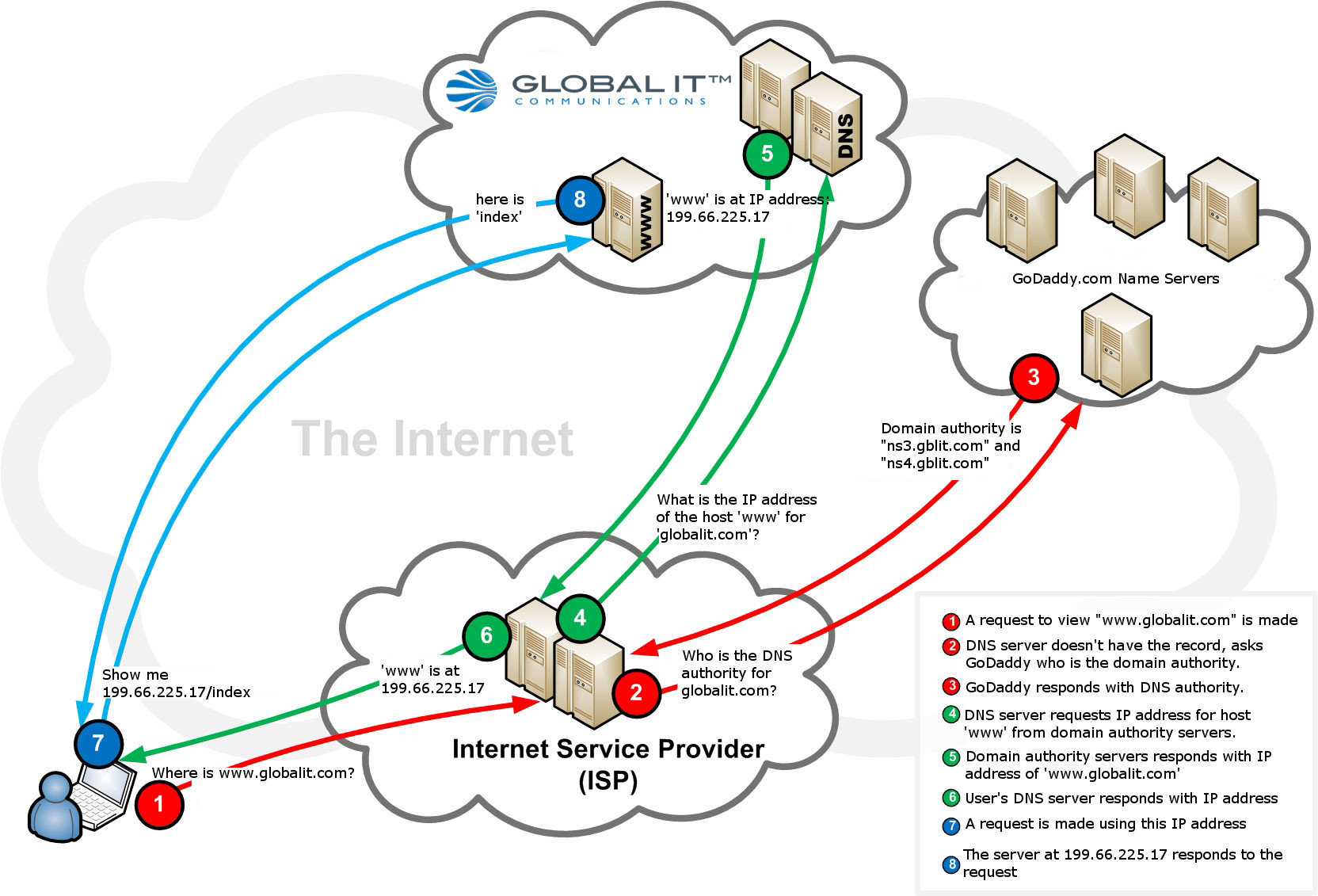
DNS (Domain Name System) is a service that resolves a web address, like globalit.com, to an IP address, like 199.66.225.17, which is the location of a server that is hosting the website. In some cases just entering an IP address will direct you to a website. However, remembering a string of arbitrary numbers isn’t as user-friendly as entering an easily remembered web address. While humans prefer to communicate in words, computers communicate using numbers.DNS-Query-Diagram

For example, let’s say you want to go to globalit.com. First, you would open your browser and enter the website you wish to view. After you press enter, a request is sent to a Name Server that checks for that particular website in its DNS databases. If the name isn’t found, the Name Server sends the request to another Name Server.  When a match is found, a response is sent back which says “Found globalit.com at 199.66.225.17”. Then your computer records this information in a temporary DNS directory, kind of like a phone book. Now each time you attempt to visit globalit.com, the computer locates it in the directory and directs you to the proper server hosting that website.

One of the most well-known free public DNS services is offered through Google. As of 2013, Google Public DNS is the largest public DNS service in the world, handling more than 130 billion requests on an average day. This is part of their effort in making the internet more accessible and easier for the public to use.

Many service providers offer DNS servers on the internet for public use. The DNS configurations settings are stored in the device’s or network’s TCP/IP configuration.

https://info.globalit.com/wp-content/uploads/2013/05/DNS-Query-Diagram-HQ.jpg

Dedicated Internet|Web Hosting

Beware of Yellow Pages Online Directory Scam

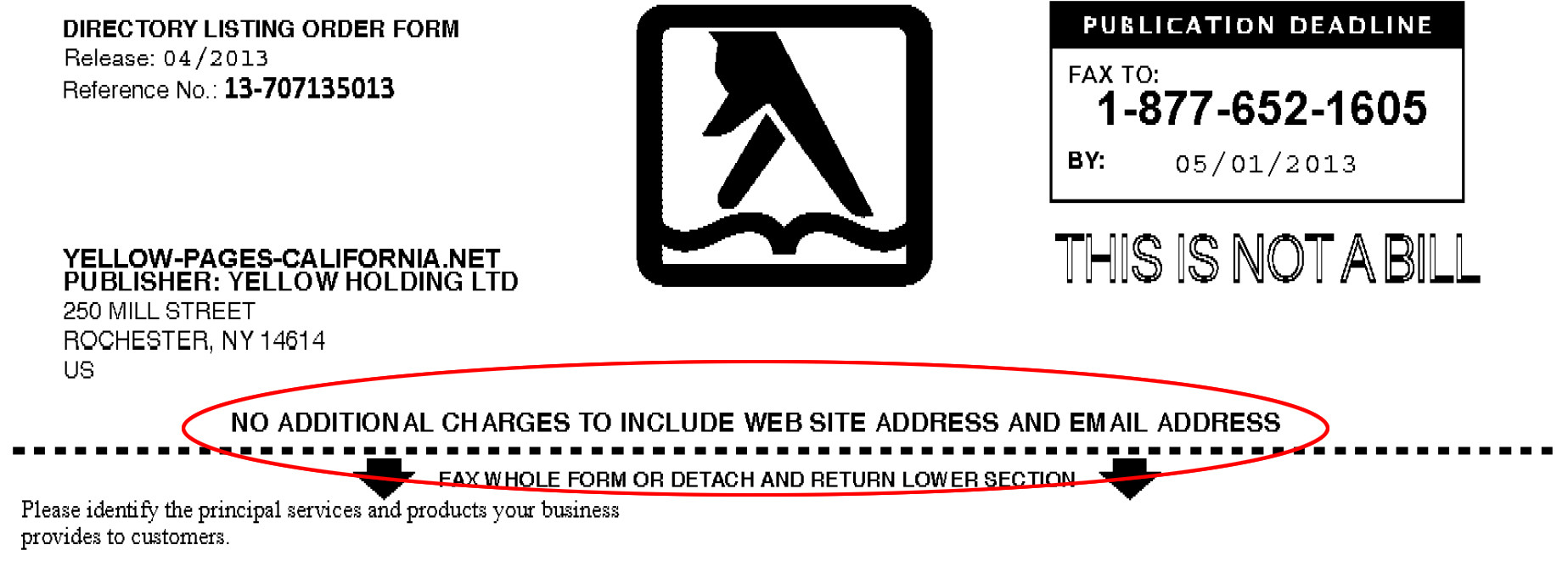
There is a reoccurring scam going on where companies (they go by various names) are soliciting business listings and misleading people to believe that they are free.  Here is an example of one that was faxed, https://globalit.com/reports/yellow-pages-scam.pdf.  These type of forms are being sent via email, fax and mail.

As you can see, they seem to be advertising that there is no charge for the listing:yellow-pages-scam-top

But if you read the fine print it says that this is an order form, that you are subject to pay $1099 for two years and that you have to cancel three months in advance or your listing will auto renew.

yellow-pages-scam-highlighted

This company will send multiple collections agencies after you if you do not pay the invoice. Have a look at their actual website.  It generate very little search results when you do a search.  Do you notice that they have the fax number listed twice, however there is no phone number for this company.

Please be cautious for companies like these.  They consistently change their name and website address to mislead people.

https://info.globalit.com/wp-content/uploads/2013/04/yellow-pages-scam-top.jpg|https://info.globalit.com/wp-content/uploads/2013/04/yellow-pages-scam-highlighted.jpg

Internet Security

Beware of Scammers Posing as Global Tech, Global PC or Global IT

scammerIf you have been contacted by a telemarketer informing that you have been sending out viruses or adware from your computer, this is a SCAM and we are recommending that you follow the following steps.  This company is known to pose as Global Tech, Global PC or Global IT and saying that they are partnered with Microsoft.



1. If you have allowed them into your computer:

  • ASAP dispute your credit card transaction with the bank.
  • Contact a trusted computer technician and ask them to remove any last installed software programs.

2. Report a complaint to the following organizations:

RESOURCES AND BLOGS CONCERNING THIS ISSUE:

Google search on Global Tech & Microsoft Scam

Microsoft article

YouTube video of captured telemarketer by IT technician

Please forward this blog post to friends, family and co-workers to help minimize the effects of this Internet Phone Scam.

Please visit our Corporate page for additional information: https://globalit.com/resources/global-microsoft-scam-alert/


https://info.globalit.com/wp-content/uploads/2013/04/scammer.png

Internet Security

Windows Keyboard Shortcuts

Windows System Key Combinations

Have you ever wondered how you could save time doing tasks on your computer? Keyboard shortcuts are a good way to save time and work more efficiently. The shortcuts below are provided by Global IT’s Internet support team. We hope you find them helpful.

F1: Help

CTRL+ESC: Open Start menu

ALT+TAB: Switch between open programs

ALT+F4: Quit program

SHIFT+DELETE: Delete item permanently

Windows Logo+L: Lock the computer (without using CTRL+ALT+DELETE)

Windows program key combinations

CTRL+C: Copy

CTRL+X: Cut

CTRL+V: Paste

CTRL+Z: Undo

CTRL+B: Bold

CTRL+U: Underline

CTRL+I: Italic

Shift + F3: Change to all caps or all lower case

Mouse click/keyboard modifier combinations for shell objects

SHIFT+right click: Displays a shortcut menu containing alternative commands

SHIFT+double click: Runs the alternate default command (the second item on the menu)

ALT+double click: Displays properties

SHIFT+DELETE: Deletes an item immediately without placing it in the Recycle Bin

General keyboard-only commands

F1: Starts Windows Help

F10: Activates menu bar options

SHIFT+F10 Opens a shortcut menu for the selected item (this is the same as right-clicking an object

CTRL+ESC: Opens the Start menu (use the ARROW keys to select an item)

CTRL+ESC or ESC: Selects the Start button (press TAB to select the taskbar, or press SHIFT+F10 for a context menu)

CTRL+SHIFT+ESC: Opens Windows Task Manager

ALT+DOWN ARROW: Opens a drop-down list box

ALT+TAB: Switch to another running program (hold down the ALT key and then press the TAB key to view the task-switching window)

SHIFT: Press and hold down the SHIFT key while you insert a CD-ROM to bypass the automatic-run feature

ALT+SPACE: Displays the main window’s System menu (from the System menu, you can restore, move, resize, minimize, maximize, or close the window)

ALT+- (ALT+hyphen): Displays the Multiple Document Interface (MDI) child window’s System menu (from the MDI child window’s System menu, you can restore, move, resize, minimize, maximize, or close the child window)

CTRL+TAB: Switch to the next child window of a Multiple Document Interface (MDI) program

ALT+underlined letter in menu: Opens the menu

ALT+F4: Closes the current window

CTRL+F4: Closes the current Multiple Document Interface (MDI) window

ALT+F6: Switch between multiple windows in the same program (for example, when the Notepad Find dialog box is displayed, ALT+F6 switches between the Find dialog box and the main Notepad window)

https://info.globalit.com/wp-content/uploads/2013/03/keyboard.jpg

Desktop Tips

Should You Make The Switch To VoIP?

voipIf you are one of the many SMB’s (small to medium business) considering switching to VoIP(Voice over Internet Protocol) as a telephone solution, you might be asking yourself, what is VoIP? Why do I need VoIP and how much does it cost?


Facts about VoIP

VoIP in the simplest explanation is making calls over the internet. Instead of using traditional phone lines to make a phone call, telephones use internet bandwidth and go out as network traffic.  There are many variations to consider in terms of setup and equipment but in layman’s terms, that’s basically it.  A phone call made over the Internet.

Things to Consider
There are also few considerations that need to be made before making a switch to VoIP service. The number one question you need to ask yourself is, “Can my network handle VoIP? “

  • Remember, a VoIP system will have an impact on your network, not just in terms of usage but a physical impact as well. Many vendors require a managed network switch to be added onto the network where VoIP will be installed. When configured correctly, a managed switch will allow for traffic policies or QoS, alleviating congestion around the VoIP traffic and allowing VoIP to pass through as a priority.
  • Do you have the correct network monitoring tools and do you understand what to look for to help isolate network issues?
  • Do you have the physical room in the network rack for the device?  Depending on the number of users, you might need to add two or three devices.

Also, your network doesn’t just consist of computers and servers. One of the most overlooked and yet one of the most important details of your network is “Cabling”. Many vendors recommend a minimum, Cat5e cable per phone. Depending on how you wish to set up your new systems, you might need to upgrade your existing cabling to Cat6.

Is there enough bandwidth for VoIP?

Many SMB companies are using DSL or Cable for high-speed internet. When upgrading to a VoIP solution, DSL or Cable may no longer be an option when using VoIP. Without sufficient bandwidth and a consistent reliable internet connection, the quality of VoIP calls is negatively affected resulting in dropped calls, echo, loss of words, noise that will only slow down productivity and leave customers questioning.

Lastly, the final component to a successful VoIP installation is engineering. Many companies have in-house IT Professionals and while they may be great at keeping your computers running smoothly they might not be familiar with all the nuances of VoIP. Therefore utilizing professionals specifically trained to work on VoIP systems and Network infrastructure is of utmost importance to secure a smooth transition and professional installation.

Global IT is a choice leader in telecom and data solutions.  Our team of certified network design engineers, licensed contractors, and support staff, can help design a network that’s right for you and ensure a smooth transition.

https://info.globalit.com/wp-content/uploads/2012/10/voip.jpg|https://info.globalit.com/wp-content/uploads/2012/10/voip-1.jpg

Internet Cabling|VoIP

The Benefits of Having a Webmaster Administrator

webmasterWith business owners focused on running their company, they have virtually no time to handle online marketing. Online marketing is crucial for the success of a business and if insufficient time is invested in it, the business will suffer. Contracting with a professional marketing firm is essential to a successful marketing campaign. With dozens of marketing strategies and services available, you are bound to adopt the strategy that is best for you. Part of this strategy is having a webmaster administrator that can make timely updates to your site. There was a time when having a full-time webmaster, whose sole purpose was to update and develop that site, was required. Not so today. With the development of content management systems designed to make maintaining a website easier, the need for site updates has evolved to two or three updates per week. There are many different types of content management systems available. Some are not user friendly and can be very complicated. Having a web administrator will free up your time and eliminate the stress and frustration associated with not being able to do your own site updates. Using an outsourced marketing firm ensures timely web updates and not only benefits you personally, but your business as well. Doing so reduces stress, increases availability and promises web site accuracy.

In addition, many webmasters have expertise in programming languages like HTML, Perl, and PHP. Often times they have knowledge with administering servers as well. This sort of knowledgeable person has the skills to develop your site and raise it to the next level. Should you want to make technical changes to your site like a domain name change or removing or adding shopping carts, which certainly requires the technically inclined, a webmaster administrator can be very beneficial.
Further, using a web marketing firm like Global IT Communications for web updates will give you piece of mind that a knowledgeable marketing team will make the precise updates you requested.

[googleplusauthor]

https://info.globalit.com/wp-content/uploads/2013/03/webmaster.jpg

Online Marketing

Spyware and Adware

Spyware-adwareSpyware and Adware are programs that are installed on a computer that perform operations that the user probably doesn’t want. Spyware is a program that was created for the purpose of collecting information and sending it to a designated entity. The information it gathers can be from which terms or phrases you are searching and which websites you are visiting, to personal and financial information like your date of birth, social security number, or credit card information. Adware has a different purpose. It will usually ‘pop-up’ advertisements in websites when you search for a specific term or phrase, or it may be an entirely separate pop-up window on your desktop that advertises something.


Now you may be thinking: “Who would install such a program?” The answer is: “More than you would think.” These programs are typically installed without the knowledge of the user. They are usually packaged together with other ‘free software’ downloaded from the internet. Think of the phrase “nothing in life is free.” This holds true for computer software. If you got it for free, there is a big chance the creator is making money somehow. Often it’s by accepting payment from companies in return for adding these programs to their ‘free software’.

Here are some identifiers that may indicate your computer is infected:

  • Your computer is slowing significantly
  • You are redirected to a different website than the one you entered
  • You get random informational or advertising pop-ups
  • Your internet connection seems very slow or stops working

There are some things you can do to prevent the installation of these programs. Some software has the option of ‘Customized Installation’ which allows you to deselect the spyware or adware program from being installed. Another way is to read the ‘Agreement’ for any indication that these programs are included, granted they are being honest in disclosing that in addition to their program, other ‘alternate’ or ‘third party applications will be installed. However, these methods do not guarantee that you won’t have spyware or adware installed. Many programs may not disclose this or the program will not function without it. Sometimes these programs can be installed by visiting an unreliable website.

The only surefire way to avoid having spyware and/or adware being installed on your computer is to only install trusted software from trusted sources, and visit only trusted websites. Trusted companies like Apple, Microsoft, Adobe, and others do not include these programs in their installation packages. More and more methods are being developed to deploy these unwanted programs.

If you suspect your computer contains spyware or adware, use a special program to find and remove these unwanted programs. Some reliable programs that are highly recommended are Ad-aware and Spybot. Remember though, some spyware and adware programs might have already done some damage to your computer that may require a qualified technician to repair. Global IT, a leader in internet security, staffs certified technicians that can restore your computer back to a level of optimal performance.

https://info.globalit.com/wp-content/uploads/2012/12/Spyware-adware.jpg

Internet Security|Webmaster

What is Web Hosting?

webhostingWeb Hosting is a service that is provided to individuals and organizations to allow their websites to be accessed and viewed by the World Wide Web. Web hosting and web design Whittier companies typically have the needed resources in place to ensure a quality website infrastructure. While there is the possibility of hosting your own website, it is not recommended.

In order to host your own website, you need an active internet connection and a database that is accessible from the internet that holds your website content. Many would argue that there are many more requirements, but this is basically all that is needed for someone to view your website. Now, the reliability, accessibility, and quality of the viewing experience can be greatly enhanced by adding in some more elements.

  • If you are using a residential internet connection, chances are your IP (Internet Protocol) address is not static, which means it can change. So if I know the IP address of your website today, I can access it. However, if it was to expire tonight and I try to access it again tomorrow, I will not be able to if the address was changed by the ISP (Internet Service Provider). This happens frequently without the knowledge of the dynamic (changing) host.
  • In addition, download speeds on consumer-grade lines are typically quite high, but the upload speeds are painfully slow, so if you have any pictures on your website, it will take quite some time for the page to load. This is frustrating for today’s internet browser. We are accustomed to pages that load very quickly, so when we come across a slow-loading page, we simply leave and find another page that doesn’t make us wait. It’s sad but true.
  • Another factor to consider is the reliability of the website. If you are hosting a website at home or a place of business, chances are you have the website loading from a single computer, and if you’re smart, you will have a UPS (Uninterruptable Power Supply) in case the power goes out. However, computers are known to crash and consumer-grade UPS’s backup power only lasts a couple of minutes. If your computer crashes or the power goes out for longer than your UPS can last, your website is inaccessible.

If you are determined to host your own website versus hiring a service provider and wish to maintain the level of reliability, accessibility, and quality that you would get, be ready to fork out some serious cash. You would need to purchase several static IP addresses, high upload bandwidth, backup generators, redundant servers, and networking equipment, and be ready to troubleshoot at a moment’s notice, night or day.

If you are still determined to host your own website but plan to do something simple like a little blog that only your family and friends will read, it’s still cheaper to use a blog-hosting service. If you are not concerned with reliability or quality, but you are with accessibility, you can register for a dynamic DNS address. This will give you a generic website name that will never change and stays current with your dynamic IP address. Your website will most likely be something like someothercompany.yourwebsite.com instead of www.yourwebsite.com or something along those lines.

If you’ve come to realize that using a web hosting service is in your best interest, there are a myriad of companies out there that provide web hosting. However, make sure you do your homework. There are a bunch of “companies” run by teenagers out of their basements, and other questionable organizations that may give you high upload speed, but lack redundancy or outage protection, or lacking in some other essential element. Do your research and choose a reputable company that has what it takes to host your website the way it should be. Global IT Communications is a premier web hosting provider.

https://info.globalit.com/wp-content/uploads/2013/01/webhosting.jpg

Web Design|Web Hosting

DIY: Online Marketing and SEO On-Page Optimization

Online-MarketingOn-Page Optimization: On-page optimization is a part of SEO that focuses on improving your website itself, making sure that everything that can be done on the website is being done, increasing the traffic flow to you as much as possible.

  • Description: The site description is very important; in order to ensure the best results, make sure you try to not surpass the proper amount of characters (currently 160).
  • The description is what is shown on all search engines when your site comes up; pack it full of rich content, so that it hooks the reader in.
  • Make sure all tags, headers, and descriptions contain your keywords. This is one of the things search engines will be looking for.
  • The website must be consistently updated.
  • A website that is rich with relevant, and new content will be held at a higher value and receive better rankings. The site map is what Google uses to navigate through your website and also to see when the most recent update was made.  If you have a clean site map and are consistently making updates, higher rankings will be received.
  • Create links to your social media pages on your site, it gives more exposure and is also more user-friendly.
  • More exposure will increase credibility and improve your networking.
  • Add blogs and forums to your website to increase value and ranking.
  • Avoid duplicate content; Google will discredit you for having any.
  • Make use of tracking codes, these allow you to see the progress of your site.
  • How many people are frequenting your website?
  • How long are people staying on your site?
  • What specifically are the viewer’s looking at?

Global IT Communications is a premier SEO company.

https://info.globalit.com/wp-content/uploads/2012/11/Online-Marketing.jpg

Online Marketing