Why Businesses in the City of Commerce, CA Should Outsource Tech Support

Business in Commerce, California, should outsource tech support if they want to grow. Commerce, California is a very business-friendly city with huge employers like Commerce Casino, Parsec, and Smart and Final. However, it also has many smaller companies who would benefit immensely from locally managed IT. Here are five reasons why outsourcing business tech support is great for businesses in places like the City of Commerce.

5 Reasons Why Business in Commerce, CA Should Outsource Tech Support

  1. Reduce Anxiety- Disaster management is worrisome. Losing data has a financial and emotional toll. With a skilled and experienced IT provider, you know your information is safe. You also know it can be recovered if there’s an emergency.
  2. Stay Focused on Your Core Business- There are lots of manufacturing and distribution companies in the City of Commerce, CA. These companies specialize in supply chain management, logistics, and shipping. Yet, IT and tech support often fall outside their skillset. Outsourcing tech support allows your employees to stay focused on what their good at, what they’re paid to do.
  3. Protect Yourself From Hackers- In 2018, the Los Angeles Social Services website was hacked and 33,000 social security numbers were exposed. Disasters happen, even to large government agencies. A tech support company will safeguard your business against hackers and bad actors.
  4. Save Money– Training an in-house IT company is expensive. In fact, the most basic tech support specialists in the United States earn $46,420 annually. System analysts earn upwards of $80,000 a year. Outsourcing tech support to a company saves a lot of money. Also, it allows you to get efficient tech support quickly. A new tech support specialist would need many years of experience before he could even dream of matching the skill of a dedicated tech support team. Many businesses in the City of Commerce aren’t large enough (like Amazon or U.S Bank) where it makes sense to bring on full-time I.T. professionals.
  5. Keep an Uninterrupted Flow of Service- It’s a huge annoyance when your website goes down or when you don’t have internet access. Even small disruptions can cost business thousands of dollars worth of productivity. When you outsource your tech support, you get those problems fixed immediately. A 24/7 dependable help desk in the City of Commerce is worth its weight in gold.

global it, tech support, city of commerce

Global IT Is a Tech Support Company Near Commerce, CA With 5 Stars on Yelp

Outsourcing tech support allows your business to focus on what matters.  If you’re looking for tech support in the City of Commerce CA, consider Global IT. We have 100% 5-star ratings on Yelp and we’re located in Whittier, which is very close to Commerce, California. Also, we provide 24/7 service, and all our techs are certified. Click the button and enter your info for a free consultation. Or call us at 562-698-2500.

Need_help_Contact_us

https://info.globalit.com/wp-content/uploads/2018/07/Commerce_Casino.jpg

https://info.globalit.com/wp-content/uploads/2018/07/Commerce_Casino.jpg|https://info.globalit.com/wp-content/uploads/2018/07/map_of_City_of_Commerce_city_ca.jpg|https://info.globalit.com/wp-content/uploads/2018/07/rsz_img_20180612_205305897_ll_002.jpg|https://info.globalit.com/wp-content/uploads/2018/07/rsz_img_20180612_205305897_ll_002-1.jpg

Case Studies

The Beginner’s Guide to Finding Great Business Tech Support in Los Angeles

Finding business tech support in Los Angeles is easy. Finding good business tech support in Los Angeles is much harder.  Linking up with the right tech support team is critical for busy professionals. Robert Kiyosaki, the Author of Rich Dad Poor Dad, said, “Finding good partners is the key to success to anything: in business, in marriage, and especially in investing.” This article will show you the simplest way to find the right tech support partner in Los Angeles County.

How to Find Great Tech Support in Los Angeles County

Here are the simplest and best ways to find great tech support.

1) Ask for Referrals- Referrals are low-hanging fruit when it comes to finding tech support. According to Nielsen, people are four times more likely to buy when referred to by a friend. As you know, good friends share good deals. The best way to discover a good tech support partner is to ask your close business friends and find someone who is 100% satisfied with their managed IT company. This effective strategy is frequently overlooked, but it often yields good results.

2) Start with Google-  If you don’t have satisfied friends, start with Google over Yelp. When it comes to business tech support in Los Angeles, Google displays more relevant results than Yelp. That’s because Yelp often shows consumer IT companies, even when you’re doing a search for business tech support. These are companies that serve consumers, such as businesses that fix phones and computers. You’re looking for companies that provide internet service, managed IT, managed cloud backup, colocation, etc.

3) End With Yelp- Once you unearth a company via Google, verify their dazzling web copy with Yelp. Working with companies that have feedback (beyond the feedback on their website) is a prudent move. You’ll typically find that feedback on Yelp. Nonetheless, you can also look for feedback on Facebook or Google Reviews. Wherever it comes from, trustworthy social proof lowers your chances of getting stuck with an unreliable or inexperienced company.

Why Google Searches Don’t Always Bring Up Relevant Tech/IT Companies

Sometimes Google search results don’t cut the mustard. In other words, remote companies often top local searches. Here’s why.

1) PPC Ads Target Faraway Cities- Don’t misunderstand, there’s nothing wrong with pay-per-click (PPC) ads. Many of you probably use pay-per-click ads to grow your business. The issue is many PPC ads advertise tech support businesses that are far away. This is especially true for cities in the LA suburbs. For example, we typed in “find IT services City of Industry”, and a tech support company in Irvine, CA topped the list. Of course, there’s nothing inherently wrong with working with a company that’s far 35 miles away because they may provide great value. However, all things being equal, a local tech support company will make quicker and cheaper visits to your office. Surprisingly, it’s often the “quickness” that businesses value over the cost-savings. Local companies schedule same-day consultations, repairs, installations, etc. Likewise, distant companies have to schedule on the next day more often. After all, LA has the world’s worst traffic congestion.

2) Spam Pages Target Faraway Cities- Google mostly provides good search results. Emphasis on the word “mostly.” Businesses looking for tech support in Los Angeles County need to watch out for one trick. Tech companies near Los Angeles County want to rank for as many cities in the county as possible. So, they’ll make multiple pages on their websites. Those pages will have titles such as “Tech Support Santa Fe Springs,” Tech Support City of Industry, Tech Support City of Commerce, and so on. This strategy often works because those terms don’t have a lot of competition. For instance, Santa Fe Springs is a popular manufacturing hub in Los Angeles. However, no business tech support companies are actually located in the city. So some fly-by-night tech support companies end up ranking first for these searches, simply because they have generic pages on their website targeting those cities. However, you can find companies that are closer and that have better reviews.

3) Google’s Algorithm Is Ineffective- Sometimes, city targeted pages aren’t to blame, and Google’s algorithm makes a mind-boggling mistake. For example, when we did a Google search for business “IT services City of Industry” a lot of the top results weren’t very helpful. We got results for “European auto services”, which obviously isn’t relevant.

Can Directories Help You Find the Right IT Help Desk?

All in all, directories are a mixed bag at best. They will display companies that aren’t easily found on Google or Yelp. That being said, they probably aren’t worth the time or effort. Still, they’re a good choice for the diligent researcher, the person who wants to leave no stone unturned. Here are the top three directories for you punctilious researchers.

1) Super Pages- Super Pages uses a different algorithm than Yelp. They tend to bring up different IT and tech companies. Unfortunately, their search engine is somewhat unrefined. For instance, we did a search for tech support in the City of Industry. The first five companies that came up were all in Los Angeles.
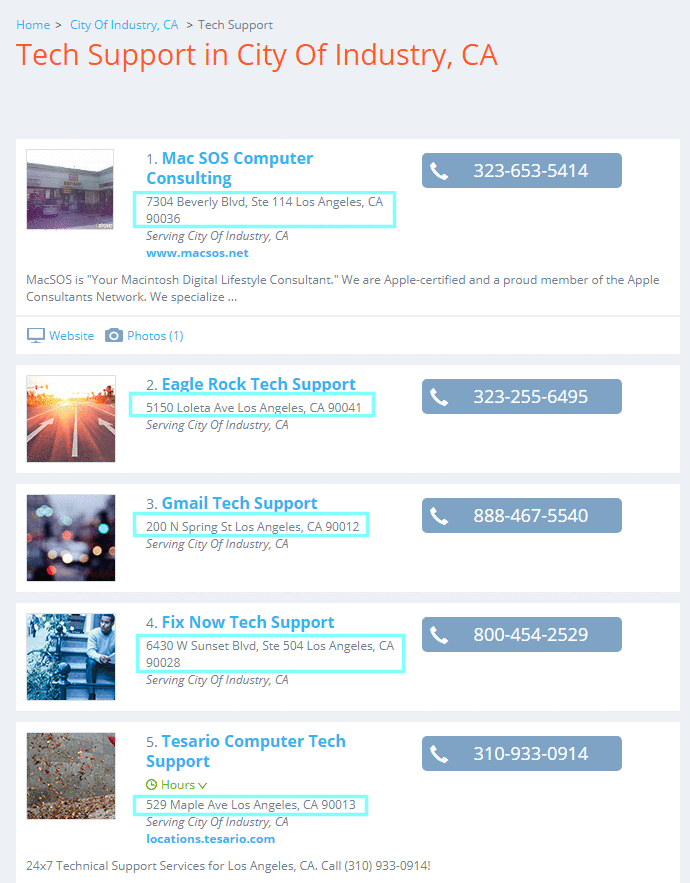
tech support city of industry super pages

As you can see, SuperPages isn’t great at finding local results for tech support for smaller cities in Los Angeles County.

2) Yellow Pages- Yellow Pages is similar to Super Pages. It has a nice layout. It’s pretty much Super Pages with a slightly different algorithm.

3) Manta- Unlike Super Pages or the Yellow Pages, Manta doesn’t list websites in their information technology results for the City of Industry. Websites are vital as they allow you to save time researching. Manta forces you to open up another tab, type the company’s name in, and find the company in the search results. It’s a tedious extra step. Also, Manta doesn’t seem to have a healthy number of results for this search. If you need to search a directory, use Super Pages or Yellow Pages. Nonetheless, Manta will provide interesting tidbits on a company you’re locked-in on, such as revenue estimates and employee estimates.

Start Your Tech Support Search With Global IT

As Robert Kiyosaki said, finding good partners is key. Here’s how busy professionals can find business tech support near Los Angeles. In summary, start with referrals from a trusted friend. From there, move onto Google searches. If you like what they’re saying, check out their web copy with Yelp.

Speaking of Yelp, Global IT has 100% 5-star reviews on Yelp and Google Reviews. We’re in Uptown Whittier, a skip and a hop from several major manufacturing/distribution cities, namely the City of Industry, the City of Commerce, and Santa Fe Springs. We also serve large clients in Los Angeles such as the Four Points Sheraton. Global IT provides tech support for accountants, manufacturers, realtors, and many other industries. We serve all of Los Angeles County, offering our IT help desk in Temple City, Commerce, and everywhere in LA county. We provide world-class unlimited tech support at a flat rate for small, medium, and large companies. Our customers love us. Click the button and enter your info for a free consultation. Or call us at 562-698-2500.

As Robert Kiyosaki said, finding good partners is key. Here’s how busy professionals can find business tech support near Los Angeles. In summary, start with referrals from a trusted friend. From there, move onto Google searches. If you like what they’re saying, check out their web copy with Yelp.

Speaking of Yelp, Global IT has 100% 5-star reviews on Yelp and Google Reviews. We’re in Uptown Whittier, a skip and a hop from several major manufacturing/distribution cities, namely the City of Industry, the City of Commerce, and Santa Fe Springs. We also serve large clients in Los Angeles such as the Four Points Sheraton. We provide world-class unlimited tech support at a flat rate for small, medium, and large companies. Our customers love us. Click the button and enter your info for a free consultation. Or call us at 562-698-2500.

Need_help_Contact_us

https://info.globalit.com/wp-content/uploads/2018/06/The-Beginners-Guide-to-Finding-Great-Business-Tech-Support-in-Los-Angeles.png

https://info.globalit.com/wp-content/uploads/2018/06/The-Beginners-Guide-to-Finding-Great-Business-Tech-Support-in-Los-Angeles.png|https://info.globalit.com/wp-content/uploads/2018/05/DSC03997.jpg|https://info.globalit.com/wp-content/uploads/2018/05/screenshot-www.superpages.com-2018.05.31-12-20-18.png|https://info.globalit.com/wp-content/uploads/2018/05/screenshot-www.google.com-2018.05.31-12-25-25.png|https://info.globalit.com/wp-content/uploads/2018/05/screenshot-www.superpages.com-2018.05.31-13-15-00.png|https://info.globalit.com/wp-content/uploads/2018/06/The-Beginners-Guide-to-Finding-Great-Business-Tech-Support-in-Los-Angeles.jpg|https://info.globalit.com/wp-content/uploads/2018/06/The-Beginners-Guide-to-Finding-Great-Business-Tech-Support-in-LA.png|https://info.globalit.com/wp-content/uploads/2018/06/screenshot-www.superpages.com-2018.08.22-12-04-31.png|https://info.globalit.com/wp-content/uploads/2018/06/screenshot-www.superpages.com-2018.08.22-12-07-14.png|https://info.globalit.com/wp-content/uploads/2018/06/screenshot-www.superpages.com-2018.08.22-12-10-29.png|https://info.globalit.com/wp-content/uploads/2018/06/imageedit_9_9382192686.png

How-To

5 Things Santa Fe Springs Managed IT Companies Won’t Tell You

Are you a business owner in manufacturing-heavy Santa Fe Springs, CA? Finding the best tech support near Santa Fe Springs can be tricky unless you’re informed. Here are five things managed IT service providers in Santa Fe Springs won’t tell you.

Five Things Managed IT Service Providers Won’t Tell You

  • They’re Not Really Near Santa Fe Springs – There are quite a few tech companies with landing pages that indicate they’re in Santa Fe Springs, CA. The truth of the matter is that very few managed IT service providers are actually in (or even near) Santa Fe Springs. Some aren’t even close, residing in the Inland Empire or South Orange County. If your managed IT service provider is far away from you, they’ll add travel expenses somewhere in their bill. Their priority will always be what is easier, local, and closer to them. So you may find delays in service and emergency call requests.
  • Managed IT Is Not Always the Solution – Santa Fe Springs largest business is Vons with 858 employees. Large businesses like Vons require managed IT services. However, not all companies need monthly monitoring and tech support. Some smaller businesses just need help when something goes wrong. Unfortunately, some managed IT service providers try to downplay break-fix services, even though they provide outstanding value for smaller businesses.
  • Many Smaller Tech Companies Don’t Provide 24/7 Support – In major markets like Los Angeles and New York, there are larger tech companies that provide round the clock support. However, in the suburbs of Los Angeles, many tech companies only have 1-2 people on staff. What happens when that key person goes home, goes on vacation, or gets sick? Basically, you don’t have access to your tech support team in case of an emergency. It’s difficult to find a local company that provides 24/7 support, although you won’t see this fact advertised on too many websites.
  • Small Teams Have Holes in Their Tech Knowledge – There’s a lot to know in the world of IT and tech support. For example, you have to know software like Microsoft, Cisco, Network Plus, and C++. Also, it’s vital to know QuickBooks and Excel because businesses use that software so often. Larger IT and tech support companies have more people who are better informed. If one person doesn’t know something, there’s a good chance someone else will know it. Also, larger companies can often attract better talent (that’s certified) because they have more funds.
  • Customer Is Not Always King – There are a lot of tech companies around Santa Fe Springs. Not all of them have a substantial amount of Yelp reviews you can look at. When this happens, you have to trust their website copy for information about them. They may have great customer service, or, they may have poor customer service. If it’s the latter, you won’t hear about it from them.

Can You Find Managed IT Service Providers Actually in Santa Fe Springs?

santa fe springs global it managed it

Where do you start looking if you want a managed IT service providers or cloud services in Santa Fe Springs? Your instinct may tell you to do a Yelp search for “managed it services” in Santa Fe Springs. Unfortunately, no result on the first page brings up a business actually located in Santa Fe Springs.

The same is true if you type in “managed service providers” in Santa Fe Springs. Zero results on the first highly-indicative page. In other words, the closest managed IT companies are located in cities next to Santa Fe Springs.

Global IT is the largest “big managed IT company” near Santa Fe Springs. Our main office is located in Whittier. Most competitors our size are located in Los Angeles or Irvine. We have 100% 5-star ratings on Yelp. Also, we’re the largest managed IT company near Santa Fe Springs. What that means for you is that we provide 24/7 service and that all our techs are certified.

Need_help_Contact_us

https://info.globalit.com/wp-content/uploads/2018/05/citylogo.png

https://info.globalit.com/wp-content/uploads/2018/05/citylogo.png|https://info.globalit.com/wp-content/uploads/2018/05/screenshot-www.yelp_.com-2018.05.31-10-11-52.png|https://info.globalit.com/wp-content/uploads/2018/05/screenshot-www.yelp_.com-2018.05.31-10-19-40.png|https://info.globalit.com/wp-content/uploads/2018/05/screenshot-www.yelp_.com-2018.06.07-10-26-17.png|https://info.globalit.com/wp-content/uploads/2018/05/ShowImage.jpg

IT Services

Top 10 Reasons to Move to the Cloud

“You should move your business to the cloud.” You probably hear this a lot, but have no idea what it really means. To be honest, you really should move your business to the cloud. But before we insist on making this change, we feel it is our job to explain to you what the cloud is, why you need to move there and how moving to the cloud will be one of the best decisions you have ever made.

How Do Cloud Services Work?

A standard computer network consists of workstations attached to a server. Companies prefer all data storage to be done on the server for security reasons, and because the server gets its data backed up while the workstations do not. Some companies will force employees to access all application software (Microsoft Office, Salesforce, etc.) from the server to make it easier to update applications and maintain them. But in most networks, there is an unhealthy combination of application software and storage on both the company server and all of the workstations.

The cloud eliminates the need for a server, solves all of your storage problems, and hosts your applications. To get started, you set up your cloud computing service through a third-party provider and create parts of your cloud where all employees can go to get applications and store data, and only certain employees can go to protected, sensitive and confidential information. You only pay for what you need, and you never have to worry about the network going down.

Then you get workstations that connect to the Internet (usually through wireless routers) and everyone accesses the company cloud computing system through a secure Internet connection. You no longer need expensive networking equipment, servers, or additional support personnel. Aside from the cost savings, there are several other good reasons why you should move your company to the cloud. Here are the top 10:

1. The Cloud is Really Flexible

With the cloud, you can start setting up satellite offices anywhere in the world and they can all connect to your company’s cloud service. You can also work with your cloud backup provider to add more services if you need them as you expand, or reduce the number of services you pay for based on changes in your business. The cloud grows with your business, and you don’t have to invest in any extra equipment to add to your network.

2. The Cloud is Secure

Since all of your data and applications are on your cloud service, you know that you will always have access to your data no matter what. If one of your field personnel gets a laptop stolen, not only can you access the data, but you can wipe out any sensitive data so it doesn’t get into the wrong hands.

3. The Cloud is Green

If you are a business with a few hundred employees and a standard computer network, then you are using a lot more energy than you need to. Your air-conditioned server room and all of the energy you use to run your network are causing all kinds of problems for the environment.

With the cloud, you get rid of all of that energy-guzzling equipment and significantly reduce your carbon footprint. This is just one way that the cloud saves you money and helps your company to do something good for the planet.

4. The Cloud is Portable

Because your cloud service is available through a secure network connection, you and your staff can access your data anywhere you can access the Internet. You simply log into your computer and your entire network is available to you. You can even get some work done while you are on vacation, but you should probably clear that with your spouse first.

5. The Cloud Protects Your Data

Does your business have a disaster recovery plan for your data? Do you back-up your data on a regular basis to an offsite and secure location? The cloud is a great way for small businesses to get the kind of data disaster recovery plan that used to only be available to large corporations, but at a fraction of the cost.

With the cloud, your data is stored in a secure facility that backs up your data on a regular basis. Your cloud provider also has offsite storage that makes sure that your data is protected from any kind of potential disaster.

6. The Cloud Unifies Your Data

When you have a standard network, there could be important documents saved on the server and workstations. There may even be versions of those documents on the laptops of field personnel. In the end, your sensitive data is not safe and different parts of your company are getting different versions of the same information.

Cloud storage is done using a centralized system where everyone can access the same document at the same time. You no longer have to worry about people making changes to the information that no one else will see because all of your data is centralized. You can also set up secured parts of your cloud storage that prevent your confidential and sensitive information from getting into the wrong hands.

7. The Cloud Updates Itself

If you use a standard network, then you know the headaches that come with updating software. If you update your network software, then every workstation has to be updated individually. Some applications are on the server, and some are local on the workstations. Updating software becomes an expensive and time-consuming job.

A cloud service updates all of your applications from one central spot, and you don’t need networking software to connect to the cloud. Your cloud provider makes sure your applications are updated and maintained, and you just keep on working.

8. The Cloud Gives You a Competitive Advantage

Simply put, the cloud gives any small business the same kind of comprehensive enterprise software solutions that only large corporations could afford in the past. If you want your business to have a competitive advantage through the use of the latest enterprise application, then move your business to the cloud.

9. The Cloud Improves Your Cash Flow

When you move to the cloud, you no longer need to spend money on expensive equipment. You can put that money back into your cash flow and grow your business. The cloud also prevents you from having to take out loans or take on debt just to keep your computer network running.

10. The Cloud Connects Your Entire Company

Teams do not have to be in the same place at the same time to work on a project. Your teams will be able to do more together and do it better with the ability to access, edit and share documents any time of the day. With the cloud, everyone can talk freely to everyone else and your company can enjoy complete collaboration.

Now is the Time

Cloud technology is constantly being improved and expanded to accommodate more business needs. If your company is not on the cloud, then you are wasting money, preventing innovation, and slowing growth. Instead of sticking with the standard networking tools you know, it is time to talk to evaluate your options and find out just how much more your company could be doing if it was using a cloud solution.

To discuss moving to managed cloud service, please visit https://globalit.com/services/cloud-services/cloud-managed-data-center/ or contact us at (877) 822-5565.

Cloud|Computer Security|Internet Security

The Future of IoT

Imagine a world where your toaster and coffee maker know what time you wake up in the morning and your toaster starts warming up, while your coffee maker starts brewing your coffee before you come downstairs. As part of your wardrobe, you put on a shirt that sends vital information to your doctor if you suddenly become ill. Your car knows exactly what temperature you like the environmental controls set to, and your tablet starts downloading news stories based on what you read the day before.

It sounds like the distant future, but it is all happening right now. It is called the Internet of Things (IoT), and it could change the way you live and work. Smart cities are already in the planning stages that reduce vehicle emissions, are much more energy efficient, and handle traffic in such a way as to reduce traffic jams and pedestrian injuries. It all sounds like a dream, but there are problems to overcome as we head into the future of IoT.

What Is IoT?

In a perfect world, IoT means that every device that runs on some sort of power is connected to the Internet, or connected directly to each other. As you can imagine, there are issues with getting some items connected to the Internet, and there is also problems justifying connecting electric toothbrushes to a central server.

As these devices go through their daily activities, they collect information that can be used in a variety of ways. As our example in the opening paragraph suggested, devices and wearable technology would be able to anticipate a person’s needs and transmit critical information on its own. The data stored can be used to make a taxi cab fleet more fuel efficient, and it can be used as evidence in a personal injury lawsuit involving a car accident.

Commercial Adaptation Of IoT

Small and large businesses have started to create IoT strategies designed to connect all of their devices to a central storage and analysis point. There are two ways businesses can implement an IoT strategy; either buy all new equipment that is already IoT enabled, or start enabling equipment one piece at a time. Obviously, the more cost effective route is to enable devices one piece at a time, but that does not make it the easiest approach.

One of the most significant problems companies have with an IoT implementation is connecting legacy devices to the Internet. Large mainframes can be connected to the Internet, but what about the company trucks? It takes a significant amount of planning to outfit any size organization with an IoT network.

The payoff for installing an IoT system is significant. Companies can monitor the condition and activities of their vehicles in detail and develop a number of fuel-saving measures. Employee productivity can be easily monitored, and that opens up the door for developing more productive methods. Companies would be able to put worker’s compensation fraud to an end, and corporate attorneys would have much more information to use in defense of the company in any kind of lawsuit.

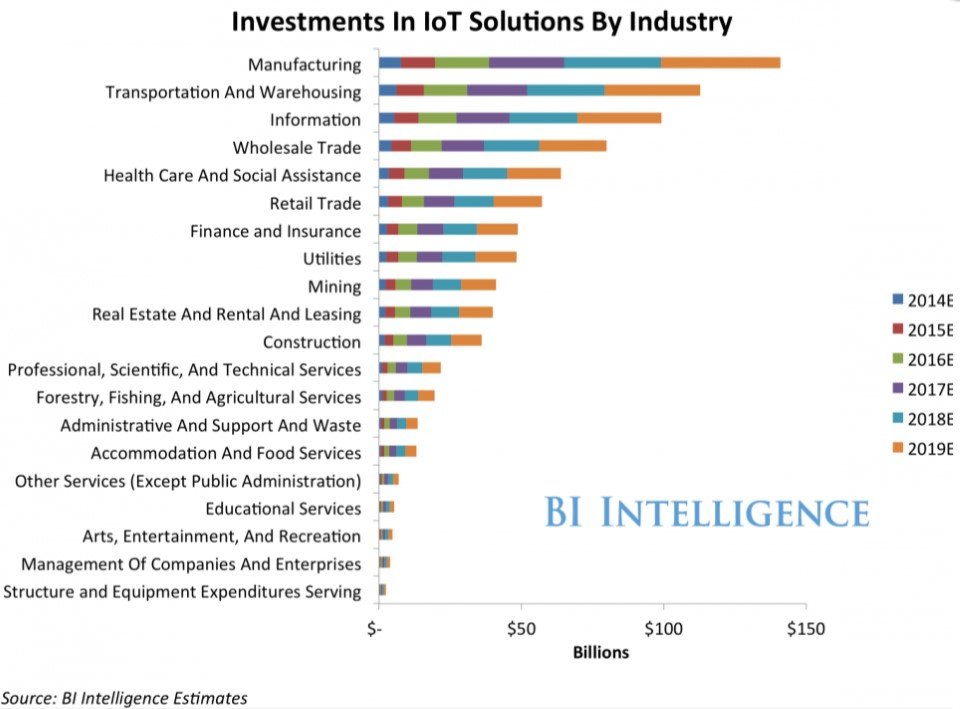
Many industries will show a massive growth toward IoT within the next several years.

which industries will advance in IoT

Is IoT Vulnerable?

The vulnerabilities in an IoT system come from the significant number of Internet connections they create. When a car sends back information about its fuel usage, it is also opens up a connection on the Internet that hackers can use to access the company network. Even your personal information is not safe when your toaster retrieves your favorite toast settings from a central server and uses that information to make your morning a little better.

Compliance Issues

Implementation of IoT networks has been going on in the corporate world long enough for government agencies to start developing laws and guidelines regarding the creation and maintenance of an IoT system. But with so much information being transmitted from so many devices, there have been plenty of concerns raised about compliance with security standards.

The protection of data has been critical, and standards such as HIPAA for storing health care data and PCI for protecting credit card information have been created to make sure that the private data of customers and patients stays safe. But with the IoT, maintaining compliance with these laws is not easy. Most of these government agencies have issued detailed ways to make sure that data is transmitted over an IoT system safely, but the laws keep changing as more and more devices are placed online.

Protecting Your Data

Some of the factors that make the IoT possible is the massive expansion of WiFi service, the dramatic drop in technology costs, and the rapid rate at which technology is being adopted around the world. But at the heart of any IoT system is a reliable and secure cloud storage solution.

Global IT has dedicated servers placed in a secure location that you can use to safely store all of your IoT data. The amount of data you will collect with a IoT system is well beyond what your company is used to handling. Instead of taking chances, it is best to rely on the experts and state-of-the-art equipment used by Global IT to protect your critical data.

Resources:

http://www.forbes.com/sites/jacobmorgan/2014/05/13/simple-explanation-internet-things-that-anyone-can-understand/#5a9a68386828

http://www.forbes.com/sites/janakirammsv/2016/08/22/10-steps-to-implementing-a-successful-enterprise-iot-strategy/2/#7b413f221fcd

https://www.thingworx.com/blog/iot-helps-business-regulatory-compliance/

http://www.business.com/technology/internet-of-things-security-compliance-risks-and-opportunities/

http://www.businessinsider.com/the-enterprise-internet-of-things-market-2015-7

Image Sources: aquaticinformatics.com and businessinsider.com

https://info.globalit.com/wp-content/uploads/2016/11/future-of-IoT-1.jpg

https://info.globalit.com/wp-content/uploads/2016/11/future-of-IoT-1.jpg|https://info.globalit.com/wp-content/uploads/2016/11/future-of-IoT.jpg|https://info.globalit.com/wp-content/uploads/2016/11/investments-in-iot-by-industry.jpg

Cloud|Computer Security|Dedicated Internet|Internet Security|IT Services|Tech News

What You Need to Know About Ransomware

If you have never heard of or experienced ransomware? If not, you can consider yourself very lucky. In this age of growing cyber crimes and online terrorism are on the rise. It is important that everyone know what ransomware is and how to fight it.

[pullquote align=”right”]Our nation’s critical infrastructure, including both private and public sector networks, are targeted by adversaries. American companies are targeted for trade secrets and other sensitive corporate data, and universities for their cutting-edge research and development. Citizens are targeted by fraudsters and identity thieves, and children are targeted by online predators. –FBI[/pullquote]

What Is Ransomware?
The simple answer to defining ransomware is that it is a virus that takes hold of your computer and demands payment to a criminal organization to get the password that will release the virus. This affects personal and corporate computers, and it has become a big business for the criminal world. It is estimated that cyber-ransoms will become a billion dollar industry in 2016, and that only includes the paid ransoms. That figure does not include the costs for repairing the computers or recovering the information.
Once ransomware is downloaded, you will get a message telling you that your computer has been locked and you will be told that you need to take some kind of action to pay the ransom. The consequences of not paying include having all of your data erased, or permanently locking up your computer.
The more complicated description of ransomware is that it preys on your more vulnerable software applications and encrypts your computer. Normally, encryption is used to protect your data. But in this case, it locks you out of your computer and requires a password that only the criminal knows. When you pay the ransom, you hope to get the password that will open up your system. In some cases, the password is not provided after the ransom has been paid.

protect-against-ransomware

[pullquote align=”right”]The FBI doesn’t support paying a ransom in response to a ransomware attack. Paying a ransom doesn’t guarantee an organization that it will get its data back—there have been cases where organizations never got a decryption key after having paid the ransom. Paying a ransom not only emboldens current cyber criminals to target more organizations, it also offers an incentive for other criminals to get involved in this type of illegal activity. And by paying a ransom, an organization might inadvertently be funding other illicit activity associated with criminals.-FBI[/pullquote]How do you get Ransomware?
In corporate settings, ransomware usually arrives in an employee’s email account as what looks like a safe and secure attachment. But when the attachment is open, the ransomware is loaded and it may start to move its way through the rest of the network.
In any setting, email is the most common way that ransomware gets loaded onto a computer. The second most common way is clicking on an infected website and having it loaded directly onto your computer. As frustrating as these can be, these delivery methods give us clues on how to combat these attacks.

Avoiding Ransomware
Always use a reputable  antivirus software vendor and can scan your received emails and warn you against websites that are infected. Never use a free AV. You should always have good antivirus operating on your computer, and you should keep your antivirus updated constantly. Corporate IT directors should keep their firewall software up to date, and have a policy in place that prohibits employees from opening email attachments.
Never open an email attachment from a sender you do not recognize. Many of these criminals try to disguise their emails as being from legitimate banks or communications providers, but you should never fall for it. One way to tell if an email is from your bank is to hover your mouse pointer over any link in the email and read the associated link at the bottom of the browser. If the link does not come from your bank, then the email is a phishing email that is looking for victims.

internet security

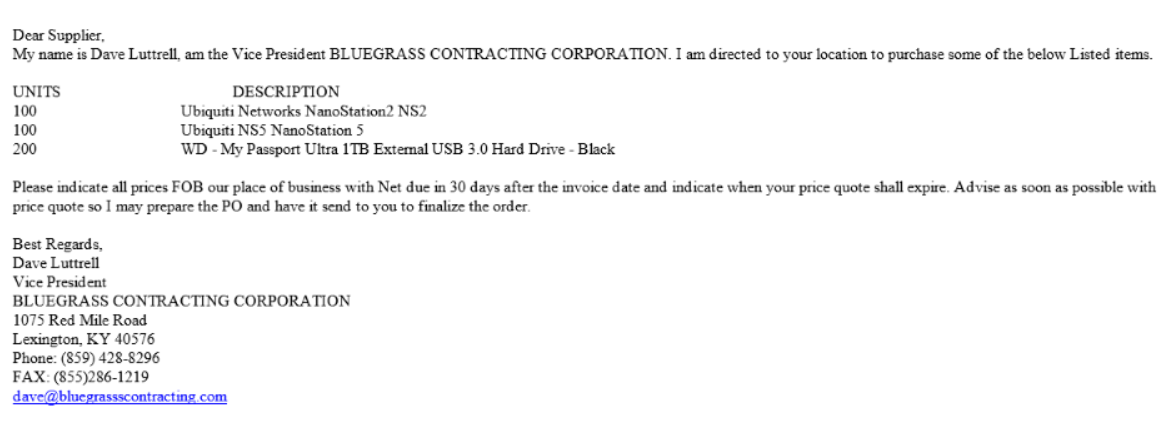
Make sure you look over the data in the email carefully. If you are not familiar with the vendor or the prospective client, call the phone number listed in the email. Here is an example of a fraudulent company that looks legitimate. If you look closely, you can see that there are (3) s’ in the email address dave@bluegrassscontracting.com. This is easy to miss.

ransomware

Corporate and personal users should always have their computers backed-up to a resource that is not online. For example, personal users can get a large capacity USB drive and back their computers up to that drive every Friday. Corporate users can utilize offline back-up systems that are constantly updated with any changes to the network in case of an attack.

cloud backup

What To Do If You Have Been Attacked

If you open an attachment in your corporate email account and you get the ransomware warning page, then contact your manager immediately. If your manager is not available, then contact the IT manager directly and alert the trusted IT group to the problem.
If you get ransomware on your personal computer, then you should call a computer support professional immediately. Do not try to take care of the problem yourself because it could become worse.

managed it

Ransomware is just one of the growing threats that honest Internet users face every day. By practicing safe computer use habits, you can reduce your chances of getting attacked and have yourself covered in case you need to have your hard drive reloaded.

https://info.globalit.com/wp-content/uploads/2016/10/ransomware-featured-image.jpg

https://info.globalit.com/wp-content/uploads/2016/10/ransomware-featured-image.jpg|https://info.globalit.com/wp-content/uploads/2016/10/cloud-backup.png|https://info.globalit.com/wp-content/uploads/2016/10/internet-security.png|https://info.globalit.com/wp-content/uploads/2016/10/managed-it.png|https://info.globalit.com/wp-content/uploads/2016/10/10-16-ransomware.png|https://info.globalit.com/wp-content/uploads/2016/10/increase-in-ransomware.jpg|https://info.globalit.com/wp-content/uploads/2016/10/ransomware.jpg|https://info.globalit.com/wp-content/uploads/2016/10/protect-against-ransomware.png|https://info.globalit.com/wp-content/uploads/2016/10/randsom-note-from-ransomware-hacker.jpg

Computer Security|Desktop Tips|Internet Security|IT Services|Tech News|Web Mail|Webmaster

What You Need to Know About Ransomware

If you have never heard of or experienced ransomware, then consider yourself lucky. But as more instances of ransomware are reported, that is not the kind of luck you want to take for granted. In this age of growing cybercrimes and online terrorism, it is important that everyone know what ransomware is and how to fight it.

What Is Ransomware?

The simple answer to defining ransomware is that it is a virus that takes hold of your computer and demands payment to a criminal organization to get the password that will release the virus. This affects personal and corporate computers, and it has become a big business for the criminal world. It is estimated that cyber-ransoms will become a billion dollar industry in 2016, and that only includes the paid ransoms. That figure does not include the costs for repairing the computers or recovering the information.

Once ransomware is downloaded, you will get a message telling you that your computer has been locked and you will be told that you need to take some kind of action to pay the ransom. The consequences of not paying include having all of your data erased, or permanently locking up your computer.

The more complicated description of ransomware is that it preys on your more vulnerable software applications and encrypts your computer. Normally, encryption is used to protect your data. But in this case, it locks you out of your computer and requires a password that only the criminal knows. When you pay the ransom, you hope to get the password that will open up your system. In some cases, the password is not provided after the ransom has been paid.

How To Combat Ransomware

In corporate settings, ransomware usually arrives in an employee’s email account as what looks like a safe and secure attachment. But when the attachment is open, the ransomware is loaded and it may start to move its way through the rest of the network.

In any setting, email is the most common way that ransomware gets loaded onto a computer. The second most common way is clicking on an infected website and having it loaded directly onto your computer. As frustrating as these can be, these delivery methods give us clues on how to combat these attacks.

Avoiding Ransomware

Never open an email attachment from a sender you do not recognize. Many of these criminals try to disguise their emails as being from legitimate banks or communications providers, but you should never fall for it. One way to tell if an email is from your bank is to hover your mouse pointer over any link in the email and read the associated link at the bottom of the browser. If the link does not come from your bank, then the email is a phishing email that is looking for victims.

Good antivirus software can scan your received emails and warn you against websites that are infected. You should always have good antivirus operating on your computer, and you should keep your antivirus updated constantly. Corporate IT directors should keep their firewall software up to date, and have a policy in place that prohibits employees from opening email
attachments.


Make sure you look over the data in the email carefully. If you are not familiar with the vendor or the prospective client, call the phone number listed in the email. Here is an example of a fraudulent company that looks legitimate. If you look closely, you can see that there are (3) s’ in the email address dave@bluegrassscontracting.com. This is easy to miss.

Corporate and personal users should always have their computers backed-up to a resource that is not online. For example, personal users can get a large capacity USB drive and back their computers up to that drive every Friday. Corporate users can utilize offline back-up systems that

are constantly updated with any changes to the network in case of an attack.


What To Do If You Have Been Attacked

If you open an attachment in your corporate email account and you get the ransomware warning page, then contact your manager immediately. If your manager is not available, then contact the IT manager directly to alert the IT group to the problem.

If you get ransomware on your personal computer, then you should call a computer support professional immediately. Do not try to take care of the problem yourself because it could
become worse.


Ransomware is just one of the growing threats that honest Internet users face every day. By practicing safe computer use habits, you can reduce your chances of getting attacked and have yourself covered in case you need to have your hard drive reloaded.


Case Studies

10 Reasons Why Your Website Should Be Mobile Friendly

Global IT has been recommending and developing responsive, mobile-friendly, websites for several years.

Read: Why Moving Toward Responsive Web Design Has a Direct Effect on Your Marketing (May 2013)

Having a website that is compatible across all platforms (desktop, tablet, and smartphone) is no longer a choice, but a necessity. Following are 10 reasons why you should be planning to move toward a mobile-friendly website if you haven’t done so already.

***The last reason listed at #10 will have the most impact on the future of online presence for EVERY industry…and this change is coming SOON.***
[googlefont font=”Lalezar” size=”25px” margin=”20px 0 10px 0″]1.) Mobile friendly websites give you a competitive advantage.[/googlefont]
[box style=”2″]”Here is the bottom line for B2B marketers:

The mobile experience is now directly impacting your fundamental online marketing success and affecting metrics such as visibility and traffic.

Providing a favorable mobile experience is absolutely required to continually engage prospects and drive leads and sales.

B2B decision-makers are using mobile devices across all phases of the buying cycle and throughout the day (including at work).

Take a look at your website analytics data. Even if mobile traffic isn’t a huge device segment today, it is growing and will continue to do so.

Get ahead of this curve. Start embracing our multi-screen world. Turn mobile marketing into your competitive advantage… today.” SearchEngineLand[/box]

[googlefont font=”Lalezar” size=”25px” margin=”20px 0 10px 0″ color=”green”]2.) Mobile friendly websites increase customer satisfaction.[/googlefont]
[box style=”2″]”In a trend which Forrester Research refers to as the ‘mobile mind shift’, the rapid increase in the use of smartphones for day-to-day tasks fuels increasingly demanding customer expectations. According to Forrester, 62% of customers who look for a company on their smartphone will expect to find a mobile-friendly website; 42% expect a company to have a mobile app and 23% expect their experience to be relevant to context (e.g. location).

Expectations go beyond just having a mobile presence; customers expect you to provide them with a great mobile experience. Customers love the ease and speed of well-designed mobile platforms while faulty links, slow-loading pages, and site errors will only serve to frustrate users. Also, as a result of user experience errors, Google now demotes mobile web page rankings in its search results, making it harder for mobile customers to find your site.

There’s a direct correlation between the quality of service you deliver and customer loyalty but a company will only get these benefits if they deliver a quality mobile experience.” UserZoom[/box]

[googlefont font=”Lalezar” size=”25px” margin=”20px 0 10px 0″ color=”green”]3.) Mobile friendly websites give your business more credibility.[/googlefont]
[box style=”2″]”Findings show that purchase decisions made by local consumers are more impacted by websites now than in 2014.

-More consumers contact a business if it has a website (36% vs 32%)
-More consumers say they are put off by an ugly website (9% vs 5%)
-Fewer consumers will use a business that doesn’t have a website (21% vs 27%)

And…having a smart website gives local business credibility in eyes of consumers.” BrightLocal[/box]

[googlefont font=”Lalezar” size=”25px” margin=”20px 0 10px 0″ color=”green”]4.) 59% of smartphone users expect companies to make their websites mobile-friendly.[/googlefont]
[box style=”2″]

1. Within 2 years, there will be 3B+ smartphones in use. The average user spends 4-5 hours per day on mobile. (Source)
2. 59% of smartphone users expect companies to make their websites mobile-friendly. (Source)
3. Mobile will account for 50% of all digital ad spend in 2016 (worth $100B). (Source)
4. Mobile accounts for 35% of all retail eCommerce transactions. (Source)
5. 37% of purchases are made after the users viewed the retailer’s site on multiple devices. (Source)
6. Of that 37%, 69% were finished on desktop. (Source)

Branch[/box]

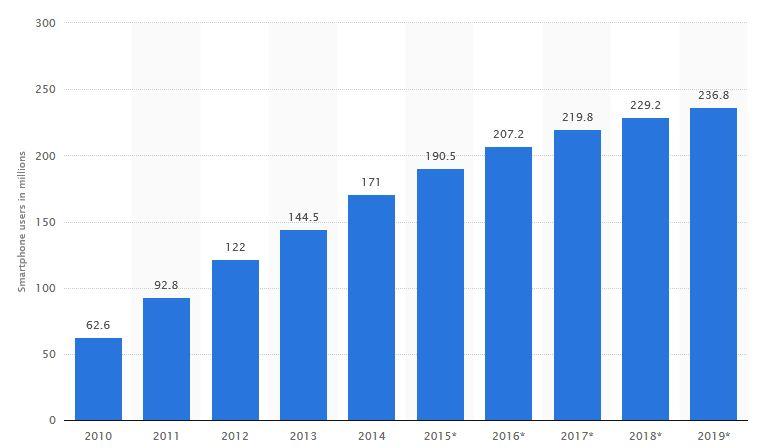
[googlefont font=”Lalezar” size=”25px” margin=”20px 0 10px 0″ color=”green”]5.) There are over 200 million smart phone users in the United States and the numbers are increasing every day.[/googlefont]
[box style=”2″][responsive]over-200-million-smartphone-users-in-the-us[/responsive]Statista[/box]

[googlefont font=”Lalezar” size=”25px” margin=”20px 0 10px 0″ color=”green”]6.) Failing to move to a mobile friendly website can result in a loss of business opportunity.[/googlefont]
[box style=”2″]”Your bounce rate measures the percentage of users that viewed one page on your site and then left. A high bounce rate indicates a problem keeping users engaged on your website. If your bounce rate is significantly higher on mobile devices than on desktop devices, it would indicate a likely issue with the way your site displays on a mobile device.

Session duration measures the average amount of time each user remained on your website. Again, a much lower session duration on mobile devices would indicate that your users are getting frustrated quickly and leaving. Not seeing much in terms of mobile and tablet traffic in your report? The most likely reason is most likely because your site isn’t mobile-friendly, you’re not getting the search or social referral traffic you would be getting if it was.

[68% of US adults] own a smartphone, and that number has only continued to grow…would you really want to miss out on [68%] of your potential customer base?!” SearlesGraphics[/box]

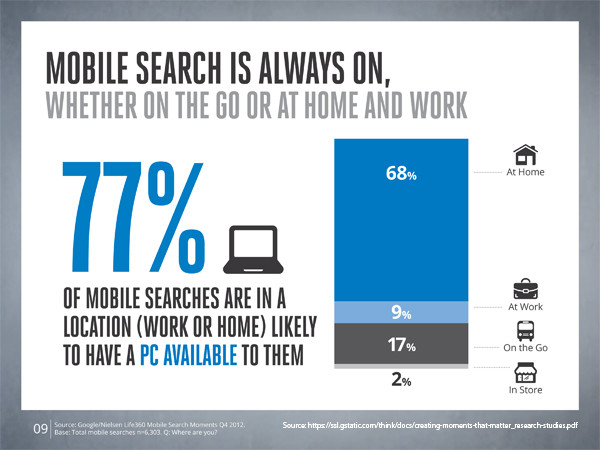
[googlefont font=”Lalezar” size=”25px” margin=”20px 0 10px 0″ color=”green”]7.) 77% of mobile searches are at home or work where a PC is available.[/googlefont]
[box style=”2″][responsive]77-percent-of-mobile-searches-are-at-home-or-work-where-a-pc-is-available-source-copy[/responsive] Gstatistic.com[/box]

[googlefont font=”Lalezar” size=”25px” margin=”20px 0 10px 0″ color=”green”]8.) Having a mobile friendly website is worth the investment.[/googlefont]
[box style=”2″]Whilst you might need to spend some money to get a top quality web designer to set up a responsive website for you, most website owners will tell you that it is money well spent. As well as preventing unhappy customers from shopping elsewhere it will mean less maintenance will be required in the future. Business.com[/box]

[googlefont font=”Lalezar” size=”25px” margin=”20px 0 10px 0″ color=”green”]9.) Google finds the need to have a mobile friendly website critical for users.[/googlefont]
[box style=”2″]”Mobile is critical to your business and will continue to be so – whether you’re blogging about your favorite sports team, working on the website for your community theater, or selling products to potential clients. Make sure visitors can have a good experience on your site when they’re visiting from their mobile devices!” Google[/box]

[googlefont font=”Lalezar” size=”25px” margin=”20px 0 10px 0″ color=”green”]10.) Google will soon be releasing a mobile index that will only display mobile friendly websites.[/googlefont]
[box style=”2″]”Currently, Google has a single index of documents for search. Google’s Gary Illyes announced they plan on releasing a separate mobile search index, which will become the primary one. Google is going to create a separate mobile index within months, one that will be the main or “primary” index that the search engine uses to respond to queries. A separate desktop index will be maintained, one that will not be as up-to-date as the mobile index.” SearchEngineLand[/box]

Now that you know the importance of having a mobile-friendly website, it’s time to check the mobile-friendliness of your website. You can do so by visiting https://www.google.com/webmasters/tools/mobile-friendly/.

If you test your website and it does not pass Google’s specifications for mobile-friendliness, you have two choices.

  1. Edit your existing website to fit Google’s specifications.
  2. Redevelop a new website.

If your website is more than two years old, chances are your best option would be to redevelop a new website. If you are interested in having Global IT provide a quote to make sure your website is mobile-friendly, you can call us at 562-698-2500 opt. 2, or submit your request to design@globalit.com.

Read more about Global IT Web Design at http://globalit.com/website-design.

https://info.globalit.com/wp-content/uploads/2016/10/google-mobile-friendly-featured-image.jpg

https://info.globalit.com/wp-content/uploads/2016/10/google-mobile-friendly-featured-image.jpg|https://info.globalit.com/wp-content/uploads/2016/10/over-200-million-smartphone-users-in-the-us.jpg|https://info.globalit.com/wp-content/uploads/2016/10/77-percent-of-mobile-searches-are-at-home-or-work-where-a-pc-is-available-source-copy.jpg

Online Marketing|Web Design

Is China Taking Over the Internet?

It appears as though countries such as China and Russia are about to have access to one of the most bureaucratic and government-independent agencies in the world, and there are a lot of people who do not like the idea. But what is really going on and is the situation really as bleak as everyone is making it out to be?

A close look at the ICANN contract with the U.S. Department of Commerce shows that the contract will lapse if not renewed on October 1, 2016. When President Obama decided not to renew the contract, Senator Ted Cruz (who was a presidential candidate at the time he introduced the bill) introduced the Protecting Internet Freedom Act to prevent the ICANN contract from lapsing. The bill is still being considered, but with the contract being allowed to lapse, a Congressional law may be useless at this point.

What Is Going On?

The Internet Corporation for Assigned Names and Numbers (ICANN) is the centralized body entrusted with regulating domain names and IP numbers throughout the Internet. It is a body made up of engineers and Internet experts from all over the world, and it was funded by the U.S. Department of Commerce until October 1, 2016. When President Obama allowed the contract with ICANN to lapse, he effectively gave up any kind of leverage the United States had with ICANN.

The act of allowing the contract with ICANN to lapse has been compared to handing the Internet over to China. But a closer examination of ICANN shows that it is basically an organization without a country that has a habit of following its own rules and creating a nightmare bureaucracy for governments to try and work with. In other words, ICANN is proud to operate on its own, and this severance from the United States only allows ICANN to work as an even more independent body.

No one country controls ICANN. There is a new committee in ICANN made up of governments from all over the world, but no one government has complete say in what happens. But should people be worried about China and this new open Internet? Recent information would say that China could very well be a threat to the Internet in more ways than one.

China Is Flexing Its Internet Muscles

Within its own borders, China is making changes to its own Internet that should be concerning to anyone outside of China. China is broadening its Internet resources and making it difficult for Western businesses to make money in China. A document that has many Western businesses very concerned is China’s newest cybersecurity law. This new law forces anyone using China’s Internet to follow all federal, regional, and local Internet laws. This would make it extremely difficult for outsiders to properly access the Internet in China, especially since many local Internet laws are unknown.

It is China’s habit of attempting to maintain control over everything that has the rest of the world concerned. Chinese Internet laws state that any information gathered on the Chinese public must remain in China. The Chinese government also has comprehensive rules on what kinds of hardware can be used on the Chinese Internet, and anyone using equipment that has not been approved is in line for serious legal repercussions.

Is China A Threat To The Internet?

China is the only oppressive country to have spent a great deal of time and money on developing Internet security and information distribution plans. China’s latest cybersecurity laws are open for the public to review, and Western business executives fear that these new laws make it increasingly difficult for Western businesses to make money in China.

China understands that money makes the world go round, and money may even be the key to running the Internet. China is already in the process of destabilizing the global economy through its cheap steel, and now China is trying to keep Western companies out of its marketplace by making its Internet increasingly exclusive.

Now that China has an equal say in ICANN thanks to the U.S. bowing out if its contract with the Internet organization, there is a real possibility that China will continue to use its aggressive tactics to have influence on how the Internet works all over the world, including inside the United States itself.

https://info.globalit.com/wp-content/uploads/2016/10/china-interent-header-image.jpg

https://info.globalit.com/wp-content/uploads/2016/10/china-interent-header-image.jpg

Tech News